Justin
Before letting a China supplier ship samples on your DHL account, make two separate decisions: agree which parcel you will pay for, then have your account administrator decide which email user may use the account. Paying for one shipment does not define the duration of a carrier-account permission.
Decision 1 — shipment and payment: identify the sender, actual samples, packed dimensions and weight, destination, applicable quote and billing arrangement. If the parcel or charges are not agreed, keep dispatch pending. You can agree to buy the samples while collection details remain unresolved.
Decision 2 — ongoing user access: match the requesting email to the verified dispatcher and let your authorized administrator check the permission being requested. An unverified dispatcher stays pending. A completed shipment does not itself remove an approved user; record a separate access-review decision.
For example, if Maya confirms the samples but Chen requests account access, agreeing to pay for the samples does not confirm Chen’s identity. Keep that access request pending while Maya verifies the dispatcher through the established supplier conversation. The filled B-21 record below shows how to keep both decisions visible.
For a multi-supplier shipping enquiry, send ChineseYiwu the supplier locations, sample descriptions, packed parcel details available so far and destination. Ask which route and charge information is still needed. Keep your carrier-account access decision with your own authorized administrator.
Key Takeaways
- Agree the parcel, payment and pickup details separately from carrier-account access.
- Keep an unfamiliar dispatcher pending until your established supplier contact confirms the identity.
- Have the account administrator inspect the requested user and permission scope.
- Recheck the shipment brief when a sender, packer or factory changes.
- Record whether access is retained or rejected after dispatch; delivery does not settle that decision.
Define the shipment before granting access
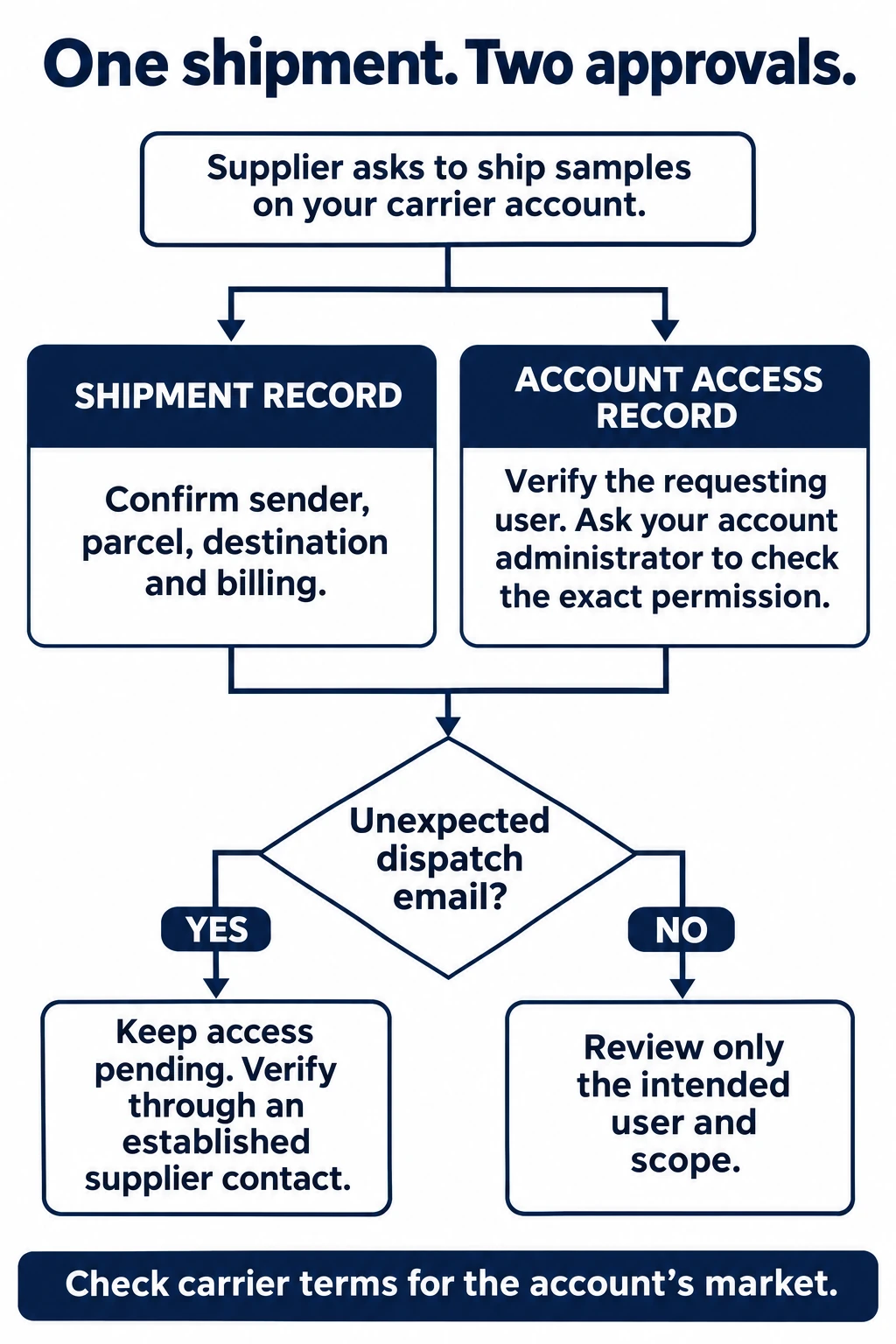
Open the full-size workflow in a new tab
- Separate shipment and account access records
- Verify sender and requesting account user
- Unexpected email: pending and verify through established contact
- Administrator sets intended permission and checks relevant market rules
Collect the supplier’s legal or trading identity, the person handling dispatch, the pickup address, receiver details and a description of the actual samples. Ask for packed dimensions and weight, rather than the weight of an unpacked product. Agree who prepares the shipment documents and who confirms collection. Keep sample readiness and collection readiness separate: a finished sample can still be waiting for packing or paperwork.
Get an applicable carrier quote or confirm the rate arrangement with your provider. Compare the supplier-paid courier quote with the applicable quote on your account using the same packed parcel and destination. Confirm which charges each quote includes and who pays any separately billed charges. Your account is not automatically cheaper than the supplier’s offer. Nor does paying the carrier directly explain every cost in a sample request. The sample-consolidation cost guide discusses the wider cost question; here the decision is who can create account-billed shipments.
If several factories are involved, decide whether they will each dispatch separately or send samples to an agreed consolidation point. Those are different shipment plans. Do not approve access for multiple senders merely because someone supplied one combined product list. Each actual dispatch still needs an identifiable sender and scope.
Check what the carrier approval actually grants
DHL’s UK eSecure guide explains that eSecure controls email users’ access to an account in MyDHL+ or eMailShip. It states that approving a user continues until that user is rejected; it is not described as a one-parcel approval. The guide also distinguishes individual users from domain-wide authorization. For a one-off supplier task, have the administrator inspect the actual permission rather than infer its scope from the sample order.
DHL’s US account help separately addresses administrators receiving a partner’s request to use an account. That is the permission question to resolve, even when the commercial sample order is already agreed.
Your written instruction can limit the supplier’s agreed task, but it does not automatically turn a broad carrier permission into a technical one-shipment restriction. If you need a narrower workflow, ask your local DHL team which tools and controls are available for your account. Features, access and the appropriate workflow should be confirmed for your own market.
For a written regional provider reference, see DHL UK’s eSecure guide. Confirm the controls available for your own account with your local DHL team.
For example, DHL’s Hungarian Import Express Online description says shipment documents can be prepared by importer or exporter and describes shipment requests and standing authorizations. It also describes keeping the import account number within that system. This is a provider example of different authorization arrangements, rather than a promise that your account has the same available setup.
One sample order, two email addresses
The following is a fictional example, not a ChineseYiwu client shipment. Buyer B-21 wants three unpowered desk-organizer samples from Supplier A. Sales contact Maya confirms the shipment plan. A carrier access request then arrives for a different factory email used by Chen, who handles dispatch.
The mismatch does not, by itself, establish a problem. It does mean the buyer has another identity to confirm. Ask Maya through the established conversation whether Chen is the intended dispatcher and what task Chen will perform. Match that reply to the actual account request before the administrator decides whether to grant access.
| Record | Decision and unresolved input | Owner |
|---|---|---|
| Shipment B-21 | Three desk-organizer samples agreed. Packed dimensions and weight outstanding. Do not treat the sample agreement as collection-ready. | Buyer and supplier dispatch contact |
| Account user | Chen’s request remains pending while Maya confirms the dispatcher through the established conversation. Administrator then decides whether this user should receive access. | Buyer’s authorized account administrator |
| After dispatch | Link the final shipment reference to B-21. Administrator records whether continued access is retained or rejected; delivery alone does not record that decision. | Buyer records shipment; administrator reviews access |
If the shipment changes after access is granted
Suppose Supplier A adds samples from a second factory after the buyer agrees to the original dispatch. Treat that as a revised shipment brief. Confirm who will pack the combined box, whose pickup address applies, and which dispatcher creates the shipment. Approval of the first sender does not identify a second one.
Write the revised parcel reference next to the access decision. If the dispatcher changes, ask the administrator to review that user rather than forward an old approval. If only the pickup date changes, update collection readiness without pretending a different user needs access. This keeps an ordinary scheduling change from becoming an unexplained account permission.
| Changed input | Record to update | Next decision |
|---|---|---|
| Pickup date only | Collection readiness | Reconfirm the collection plan. |
| Different dispatcher | User identity and shipment brief | Administrator reviews the intended user. |
| Second factory added | Packer, pickup address and parcel details | Confirm the revised shipment before dispatch. |
| Shipment delivered | Shipment reference and access record | Administrator decides retained or rejected access. |
Keep shipment status and access status visible
Ask for the final shipment reference and record who is arranging collection. Save the relevant dispatch documents with the sample order. A created shipment reference, a collected parcel and a delivered sample are different milestones; avoid using one status word for all three. If pickup changes, update the collection plan rather than assume a label proves the parcel left the supplier.
After the one-off task, ask the administrator to review whether supplier access is still appropriate. DHL’s US account support guidance provides account-administrator instructions for managing partner requests and revoking authorization. Use the local account guidance or support team for the actual process. Record the review outcome even when continued access is deliberately retained for recurring shipments.
For a multi-supplier sample enquiry, send ChineseYiwu the supplier locations, sample descriptions, packed details available so far and destination through the shipping enquiry form. Ask what information is needed to discuss the route and charges. Carrier-account administration remains with your authorized account owner; a sourcing enquiry does not transfer that authority.
The useful outcome is two clear records: an identified sample shipment with an agreed billing plan, and a separately understood decision about who can continue using the carrier account.
Conclusion
Keep one record for the sample shipment and another for account access. Give the supplier a clear parcel brief, give the administrator a verified user request, and name who reviews continued access after dispatch. That makes the next action visible without assuming the two approvals expire together.
Questions fréquemment posées
No. Agreeing the shipment cost records a commercial decision. The account administrator must separately inspect the actual user request and available permission controls.
What if the dispatch email differs from the sales contact?
Keep the request pending while the established supplier contact confirms the intended dispatcher. A different address needs verification; it does not by itself prove misconduct.
Does delivery automatically remove the supplier’s access?
Do not assume so. The cited regional DHL guidance describes continuing authorization. Have the administrator confirm the local tool’s actual behavior and record whether access is retained or rejected.